<style> #title { height: 100% !important; display: flex !important; flex-direction: column !important; justify-content: center !important; } </style> <section id="title" data-background="/images/presentations/bg.svg.png" data-transition-speed="slow"> # Building computational analysis pipelines Nathan Sheffield <span style="font-size:0.6em"></span> <div class="bullet"> <img src="/images/external/uva_dgs_logo.svg" height="85"> <img src="/images/logo/logo_databio_long.svg" height="65"> </div> <span style="font-size:0.6em"><a href="http://www.databio.org/slides">www.databio.org/slides</a></span> </section> --- # Talk outline 1. What is a pipeline? 2. Interactive computing to shell scripts 4. Bioinformatics pipeline frameworks 5. Modular pipeline engineering --- # What is a pipeline? > A series of commands to run on input data > to produce some result ```text $ bowtie2 ... $ trimmomatic ... $ mac2s ... ``` <div class="fragment"> <div class="col2">workflow</div> <div class="col2">pipeline</div> </div> <div class="fragment"> Often considered synonyms. To me: 'workflow' emphasizes *reproducibility* 'pipeline' emphasizes *reusability* </div> --- # reusability and reproducibility *reproducibility*: you can re-run the analysis with the same inputs to get the same outputs. *reusability*: you can re-use the analysis with different inputs to get compatible (but different) outputs. --- # Analysis spectrum <img src="/slides/2023-10-bioinformatics-pipeline-development/pipeline_spectrum.svg" width="575" style="padding-top:25px; padding-bottom:25px; background:white"><br> <div class="fragment"> Is one inherently *best*? no. Each has pros and cons and applies best to different needs. </div> --- <table class="bullets"> <tr> <td width="135"><img src="/_modules/pipelines-jordan/jordan_smile.svg" align="left" width="125" /></td> <td>Jordan got data from the sequencer today.</td> </tr> </table> <table class="bullets fragment" style="border:0px solid black; border-collapse: collapse;"> <tr> <td width="135"><img src="/_modules/pipelines-jordan/console.svg" align="left" width="125" /></td> <td>He sits down at the terminal to process it. <span> ```bash bowtie2 sample.fastq ... trimmomatic ... macs2 output.fastq ... ``` </span> </td> </tr> </table> <table class="bullets fragment"> <tr> <td width="135"><img src="/_modules/pipelines-jordan/coin-thumbs--up.svg" width="125" /></td> <td>Nice!</td> </tr> </table> --- Two weeks later... --- <table class="bullets"> <tr> <td width="135"><img src="/_modules/pipelines-jordan/jordan_smile.svg" width="125" /></td> <td>Jordan got data from the sequencer today.</td> </tr> </table> <table class="bullets fragment"> <tr> <td width="135"><img src="/_modules/pipelines-jordan/console.svg" align="left" width="125" /></td> <td>He sits down at the terminal to process it.</td> </tr> </table> <table class="bullets fragment"> <tr> <td width="135"><img src="/_modules/pipelines-jordan/jordan_confused.svg" align="left" width="125" /></td> <td>Hmm... what did I do last time?</td> </tr> </table> --- <table class="bullets"> <tr> <td width="135"><img src="/_modules/pipelines-jordan/jordan_idea.svg" width="125" /></td> <td>Jordan has an idea.</td> </tr> </table> <table class="bullets fragment"> <tr> <td width="135"><img src="/_modules/pipelines-jordan/app.svg" width="125" /></td> <td>He sits down at the terminal to <span style="text-decoration: line-through;">process</span> <b>script</b> it.</td> </tr> </table> <table class="bullets fragment"> <tr> <td width="135"><img src="/_modules/pipelines-jordan/coin-thumbs--up.svg" width="125" /></td> <td>Nice!</td> </tr> </table> --- Two weeks later... --- <table class="bullets"> <tr> <td width="135"><img src="/_modules/pipelines-jordan/jordan_smile.svg" width="125" /></td> <td>Jordan got data from the sequencer today.</td> </tr> </table> <table class="bullets"> <tr> <td width="135"><img src="/_modules/pipelines-jordan/file_shell_script.svg" width="125" /></td> <td>He gets the script running...</td> </tr> </table> <table class="bullets fragment"> <tr> <td width="135"><img src="/_modules/pipelines-jordan/server-crash.svg" width="125" /></td> <td>The server crashes. It would be nice if the script could pick up where it left off...</td> </tr> </table> --- <table class="bullets"> <tr> <td width="135"><img src="/_modules/pipelines-jordan/jordan_smile.svg" width="125" /></td> <td>Now Jordan has 500 samples for a time series experiment.</td> </tr> </table> <table class="bullets fragment"> <tr> <td width="135"><img src="/_modules/pipelines-jordan/refresh.svg" width="125" /></td> <td>He starts writing some looping functions to handle cluster submission.</td> </tr> </table> <table class="bullets fragment"> <tr> <td width="135"><img src="/_modules/pipelines-jordan/clock.svg" width="125" /></td> <td>This is going to take awhile...</td> </tr> </table> --- <table class="bullets"> <tr> <td width="135"><img src="/_modules/pipelines-jordan/jordan_smile.svg" width="125" /></td> <td>In the meantime, Jordan generates other samples requiring slightly different parameters.</td> </tr> </table> <table class="bullets fragment"> <tr> <td width="135"><img src="/_modules/pipelines-jordan/file_shell_script2.svg" width="125" /></td> <td>No problem, I'll just duplicate this script...</td> </tr> </table> <table class="bullets fragment"> <tr> <td width="135"><img src="/_modules/pipelines-jordan/lily_open.svg" width="125" /></td> <td>Stop! There is a better way...</td> </tr> </table> --- # Challenges with interactive computing - low reproducibility - low reusability - no restartability - no maintainability --- # Challenges with shell pipelines - only some of reproducibility solved - only some of reusability solved - still no restartability - failed steps do not halt the entire pipeline - difficult to scale to 500 samples - two pipelines running simultaneously may interfere - tracking which version was used with which samples - memory use is left unmonitored and unchecked - difficult to maintain - no record of the output produced by default --- # Analysis spectrum <img src="/slides/2023-10-bioinformatics-pipeline-development/pipeline_spectrum.svg" width="575" style="padding-top:25px; padding-bottom:25px; background:white"><br> --- # Pipeline frameworks https://github.com/pditommaso/awesome-pipeline --- # Common frameworks used in bioinformatics 1. Snakemake 2. Nextflow 3. CWL --- # Snakemake ```text SAMPLES = ["A", "B"] rule all: input: "plots/quals.svg" rule bwa_map: input: "data/genome.fa", "data/samples/{sample}.fastq" output: "mapped_reads/{sample}.bam" shell: "bwa mem {input} | samtools view -Sb - > {output}" rule samtools_sort: input: "mapped_reads/{sample}.bam" output: "sorted_reads/{sample}.bam" shell: "samtools sort -T sorted_reads/{wildcards.sample} " "-O bam {input} > {output}" rule samtools_index: input: "sorted_reads/{sample}.bam" output: "sorted_reads/{sample}.bam.bai" shell: "samtools index {input}" rule bcftools_call: input: fa="data/genome.fa", bam=expand("sorted_reads/{sample}.bam", sample=SAMPLES), bai=expand("sorted_reads/{sample}.bam.bai", sample=SAMPLES) output: "calls/all.vcf" shell: "bcftools mpileup -f {input.fa} {input.bam} | " "bcftools call -mv - > {output}" rule plot_quals: input: "calls/all.vcf" output: "plots/quals.svg" script: "scripts/plot-quals.py" ``` --- # Nextflow ```text #!/usr/bin/env nextflow params.in = "$HOME/sample.fa" sequences = file(params.in) SPLIT = (System.properties['os.name'] == 'Mac OS X' ? 'gcsplit' : 'csplit') process splitSequences { input: file 'input.fa' from sequences output: file 'seq_*' into records """ $SPLIT input.fa '%^>%' '/^>/' '{*}' -f seq_ """ } process reverse { input: file x from records output: stdout result """ cat $x | rev """ } result.subscribe { println it } ``` --- # Common Workflow Language (CWL) ```text cwlVersion: v1.2 # What type of CWL process we have in this document. class: CommandLineTool # This CommandLineTool executes the linux "echo" command-line tool. baseCommand: echo # The inputs for this process. inputs: message: type: string # A default value that can be overridden, e.g. --message "Hola mundo" default: "Hello World" # Bind this message value as an argument to "echo". inputBinding: position: 1 outputs: [] ``` --- # Challenges with pipeline frameworks - learning curve - evaluation: how do you pick? - lock-in - lack of interoperability <li class="fragment">all-or-none adoption required</li> --- # Modular pipeline engineering --- #### Most pipelines require individual metadata organization <div class="col2"> <img src="/_modules/motivation-modular-pipelines/pep/data_input-new_white.svg" width="375"> </div> <div class="col2 fragment"> <img src="/_modules/motivation-modular-pipelines/pep/data_input-rev_white.svg" width="375"> </div> --- ### What if? <div class="col2"> <img src="/_modules/motivation-modular-pipelines/pep/data_input2.svg" width="325"> </div> <div class="col2"> <img src="/_modules/motivation-modular-pipelines/pep/data_input2_rev.svg" width="325"> </div> <div class="fragment"> Why is this hard to do? <br>Because of <i>microwave syndrome</i>.... </div> --- #### Microwave syndrome <div> <img src="/_modules/motivation-modular-pipelines/IFB_17PM-MEC1.png" height="180"> <img src="/_modules/motivation-modular-pipelines/LG_LMV2031SB.png" height="180"> <img src="/_modules/motivation-modular-pipelines/panasonic_NN-CT585SBPQ.png" height="180"> </div> <div class="well fragment">In user interface design, prioritizing easy access to integrated functions over their individual components. </div> --- <section style="font-size: 0;"> <img src="/_modules/motivation-modular-pipelines/IFB_17PM-MEC1.png" height="120"> <img src="/_modules/motivation-modular-pipelines/LG_LMV2031SB.png" height="120"> <img src="/_modules/motivation-modular-pipelines/panasonic_NN-CT585SBPQ.png" height="120"><br> <img src="/_modules/motivation-modular-pipelines/IFB_17PM-MEC1_console.jpg" height="560"> <img src="/_modules/motivation-modular-pipelines/LG_LMV2031SB_console.jpg" height="560" class="fragment"> <img src="/_modules/motivation-modular-pipelines/panasonic_NN-CT585SBPQ_console.jpg" height="560" class="fragment"> </section> --- <section transition="fade-in"> <img src="/_modules/motivation-modular-pipelines/pipelines/pipeline_chunk.svg" height="650"> </section> --- <section transition="fade-in"> <img src="/_modules/motivation-modular-pipelines/pipelines/pipeline_chunk2.svg" height="650"> </section> --- ### The UNIX philosophy <div class="col2"> <img src="/_modules/motivation-modular-pipelines/unix_book.jpg" height="450"> </div> <div class="col2"> <div class="well"><span style="color:#ffb; font-weight:bold">[T]he power of a system comes more from the relationships among programs than from the programs themselves.</span><br><br> <span style="font-size: 0.8em">Many UNIX programs do quite trivial tasks in isolation, but, combined with other programs, become general and useful tools.</span><br/><br/> <span class="small">- Kernighan and Pike, The UNIX Programming Environment (1983, p. viii)</span> </div> </div> --- <section transition="fade-in"> <img src="/_modules/motivation-modular-pipelines/pipelines/modularity_spectrum.svg" height="650"> </section> --- <section transition="fade-in"> <img src="/_modules/motivation-modular-pipelines/pipelines/modularity_spectrum2.svg" height="650"> </section> --- <section transition="fade-in" id="links1"> <img src="/_modules/motivation-modular-pipelines/pipelines/pipeline_links1.svg" height="650"> </section> --- <section transition="fade-in" id="links2"> <img src="/_modules/motivation-modular-pipelines/pipelines/pipeline_links2.svg" height="650"> </section> --- <section transition="fade-in" id="links3"> <img src="/_modules/motivation-modular-pipelines/pipelines/pipeline_links3.svg" height="650"> </section> --- <section transition="fade-in" id="links4"> <img src="/_modules/motivation-modular-pipelines/pipelines/pipeline_links4.svg" height="650"> </section> --- <section transition="fade-in" id="links5"> <img src="/_modules/motivation-modular-pipelines/pipelines/pipeline_links5.svg" height="650"> </section> --- <section transition="fade-in" id="links6"> <img src="/_modules/motivation-modular-pipelines/pipelines/pipeline_links6.svg" height="650"> </section> --- # Ecosystem of modules for pipeline building - [PEP](https://pep.databio.org) -- standardizing representation of sample metadata - [geofetch](https://geofetch.databio.org) -- retrieving data from GEO - [pypiper](https://pypiper.databio.org) -- building simple, sequential Python pipelines - [pipestat](https://pipestat.databio.org) -- reporting and storage of pipeline results - [refgenie](https://refgenie.databio.org) -- access to reference genome resources - [looper](https://looper.databio.org) -- processing multi-sample projects, job submission - [divvy](https://looper.databio.org) -- configuring compute cluster resources - [bulker](https://bulker.io) -- distributing independent, containerized computing environments --- <div class="col2"> <h3>Problem</h3> <img src="/slides/2023-10-bioinformatics-pipeline-development/data_input-new_white.svg" width="375"> </div> <div class="col2 fragment"> <h3>Solution</h3> <img src="/slides/2023-10-bioinformatics-pipeline-development/data_input_plug.svg" width="375"> </div> --- <section> <h4>PEP: A standard format for project metadata</h4> <img src="/slides/2023-10-bioinformatics-pipeline-development/pep_center_white.svg" width="700"> </section> --- <div class="bullet"> <h2><img src="/slides/2023-10-bioinformatics-pipeline-development/pep_logo.svg" width="70">PEP format</h2> </div> <div class="bullet"> <img src="/slides/2023-10-bioinformatics-pipeline-development/file.svg" width="30"> project_config.yaml </div> ```yaml pep_version: 2.0 sample_table: /path/to/samples.csv ... (project-level metadata) ``` <hr> <div class="bullet"> <img src="/slides/2023-10-bioinformatics-pipeline-development/file.svg" width="30"> samples.csv </div> ```text sample_name, protocol, organism, data_source frog_0h, RNA-seq, frog, /path/to/frog0.gz frog_1h, RNA-seq, frog, /path/to/frog1.gz frog_2h, RNA-seq, frog, /path/to/frog2.gz frog_3h, RNA-seq, frog, /path/to/frog3.gz ``` --- ## <img src="/_modules/pypiper/logo_pypiper.svg" width="250" style="vertical-align: middle;"> Pypiper Builds a pipeline for a single sample. <div class="small"> GitHub: <a href="http://github.com/databio/pypiper">http://github.com/databio/pypiper</a> Documentation: <a href="http://pypiper.readthedocs.io">http://pypiper.readthedocs.io</a> </div> --- ## Pypiper features <div style="display: flex; justify-content: space-between;"> <div style="width: 45%; text-align: left;"> <span class="bullet"><img src="/_modules/pypiper/icons/yinyang.svg" width="50" class="bullet"> Simplicity</span><br> <span class="bullet"><img src="/_modules/pypiper/icons/refresh.svg" width="50" class="bullet"> Restartability</span><br> <span class="bullet"><img src="/_modules/pypiper/icons/lock.svg" width="50" class="bullet"> File integrity lock</span><br> <span class="bullet"><img src="/_modules/pypiper/icons/increase.svg" width="50" class="bullet"> Memory monitoring</span><br> </div> <div style="width: 45%; text-align: left;"> <span class="bullet"><img src="/_modules/pypiper/icons/magnify.svg" width="50" class="bullet"> Job monitoring</span><br> <span class="bullet"><img src="/_modules/pypiper/icons/redx.svg" width="50" class="bullet"> Robust error handling</span><br> <span class="bullet"><img src="/_modules/pypiper/icons/file_log.svg" width="50" class="bullet"> Automatic logging</span><br> <span class="bullet"><img src="/_modules/pypiper/icons/printer.svg" width="50" class="bullet"> Easy result reports</span><br> <span class="bullet"><img src="/_modules/pypiper/icons/collate.svg" width="50" class="bullet"> Collate input files</span><br> </div> </div> --- ## <span class="bullet"><img src="/_modules/pypiper/icons/yinyang.svg" width="50" class="bullet"> Simplicity</span> Bash script: ```bash shuf -i 1-500000000 -n 10000000 > outfile.txt ``` Pypiper script: ```python pm.run("shuf -i 1-500000000 -n 10000000 > outfile.txt") ``` Using pypiper is as easy as writing a shell script. Additional *options* provide power *on demand*. --- ## <span class="bullet"><img src="/_modules/pypiper/icons/refresh.svg" width="50" class="bullet"> Restartability</span> ```python target = os.path.join(outfolder, "outfile.txt") # output file cmd = "shuf -i 1-500000000 -n 10000000 > " + target pm.run(command, target) ``` Commands (optionally) only run if target does not already exist. Pipeline will thus pick up where it left off. --- ## <span class="bullet"><img src="/_modules/pypiper/icons/lock.svg" width="50" class="bullet"> File integrity lock</span> **Lock files** ensure commands only run if the target is unlocked: - pipelines will not proceed with incomplete files - multiple pipelines can create/use the same files --- ## <span class="bullet"><img src="/_modules/pypiper/icons/magnify.svg" width="50" class="bullet"> Job monitoring</span> Pypiper uses a flag system to track status <span class="bullet"><img src="/_modules/pypiper/icons/flag_green.svg" width="50" class="bullet"> Job running <img src="/_modules/pypiper/icons/flag_checker.svg" width="50" class="bullet"> Job completed <img src="/_modules/pypiper/icons/flag_red.svg" width="50" class="bullet"> Job failed</span> Summarizing jobs is easy: just count the flags --- ## <span class="bullet"><img src="/_modules/pypiper/icons/redx.svg" width="50" class="bullet"> Robust error handling</span> <img src="/_modules/pypiper/fail_pipeline.svg" height="400"> If a process fails, the pipeline fails. --- ## <span class="bullet"><img src="/_modules/pypiper/icons/file_log.svg" width="50" class="bullet"> Automatic logging</span> <img src="/_modules/pypiper/log_split.svg" height="400"> Output is automatically split to screen and file. --- ## <span class="bullet"><img src="/_modules/pypiper/icons/printer.svg" width="50" class="bullet"> Easy result reports</span> ```python reads = count_reads(unaligned_file) aligned = count_reads(aligned_file) pm.report_result("aligned_reads", aligned) pm.report_result("alignment_rate", aligned/reads) ``` Output: ```tsv aligned_reads 2526232 alignment_rate 0.64234 ``` --- ## Example pipeline ```python import pypiper, os outfolder = "pipeline_output/" # folder for results pm = pypiper.PipelineManager(name="shuf", outfolder) target = os.path.join(outfolder, "outfile.txt") # output file command = "shuf -i 1-500000000 -n 10000000 > " + target pm.run(command, target) pm.stop_pipeline() ``` --- ## <img src="/_modules/looper/logo_looper.svg" width="150" style="vertical-align: middle;"> Looper Deploys pipelines across samples by connecting samples to any command-line tool <div class="small"> <a href="https://looper.databio.org">https://looper.databio.org</a> </div> --- <img src="/_modules/looper/looper_role_white_v2.svg" width="100%"> --- ## pipeline_interface.yaml ```yaml protocol_mappings: RNA-seq: rna-seq pipelines: rna-seq: name: RNA-seq_pipeline path: path/to/rna-seq.py arguments: "--option1": sample_attribute "--option2": sample_attribute2 ``` - maps protocols to pipelines <!-- .element: class="fragment" --> - maps sample attributes (columns) to pipeline arguments <!-- .element: class="fragment" --> --- ## Looper features <div style="display: flex; justify-content: space-between;"> <div style="width: 45%; text-align: left;"> <span class="bullet"><img src="/_modules/looper/icons/input-mouse.svg" width="50" class="bullet"> Single-input runs</span><br> <span class="bullet"><img src="/_modules/looper/icons/flexible.svg" width="50" class="bullet"> Flexible pipelines</span><br> <span class="bullet"><img src="/_modules/looper/icons/piechart.svg" width="50" class="bullet"> Flexible resources</span><br> </div> <div style="width: 45%; text-align: left;"> <span class="bullet"><img src="/_modules/looper/icons/computer.svg" width="50" class="bullet"> Flexible compute</span><br> <span class="bullet"><img src="/_modules/looper/icons/flag_checker.svg" width="50" class="bullet"> Job status-aware</span><br> </div> </div> --- ## <span class="bullet"><img src="/_modules/looper/icons/input-mouse.svg" width="50" class="bullet"> Single-input runs</span> Run your entire project with one line: ```bash looper run project_config.yaml ``` --- ## <span class="bullet"><img src="/_modules/looper/icons/flexible.svg" width="50" class="bullet"> Flexible pipelines</span> ```yaml protocol_mappings: RRBS: rrbs WGBS: wgbs EG: wgbs.py SMART-seq: rnaBitSeq -f; rnaTopHat -f ATAC-SEQ: atacseq DNase-seq: atacseq CHIP-SEQ: chipseq ``` Many-to-many mappings --- ## <span class="bullet"><img src="/_modules/looper/icons/piechart.svg" width="50" class="bullet"> Flexible resources</span> ```yaml pipeline_key: name: pipeline_name arguments: "--option" : value resources: default: file_size: "0" cores: "2" mem: "6000" time: "01:00:00" large_input: file_size: "2000" cores: "4" mem: "12000" time: "08:00:00" ``` Resources can vary by input file size --- ## <span class="bullet"><img src="/_modules/looper/icons/computer.svg" width="50" class="bullet"> Flexible compute</span> ```yaml compute: slurm: submission_template: templates/slurm_template.sub submission_command: sbatch localhost: submission_template: templates/localhost_template.sub submission_command: sh ``` --- Adjust compute package on-the-fly: ```bash looper run project_config.yaml --compute localhost ``` --- ## <span class="bullet"><img src="/_modules/looper/icons/flag_checker.svg" width="50" class="bullet"> Job status-aware</span> Looper only submits jobs for samples not already flagged as running, completed, or failed. ```bash looper check project_config.yaml ``` ```bash looper summarize project_config.yaml ``` --- ## Pipestat <div> <img src="/_modules/pipestat/pipestat_logo.svg" width="250"><br><br> Standardized pipeline result reporting.<br> <div class="small"> <a href="https://pipestat.databio.org">https://pipestat.databio.org</a><br> </div> </div> --- 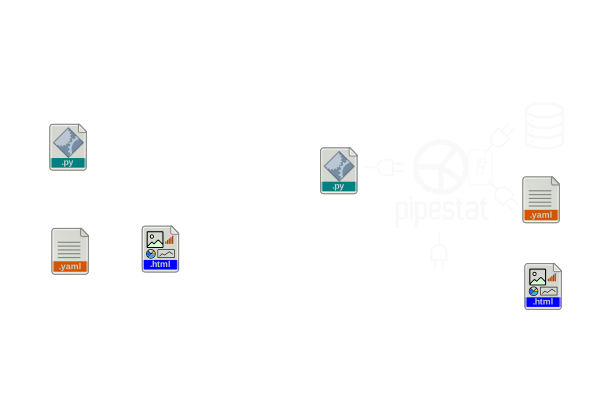 --- # Advantages of the modular approach - individual components may be used independently - improved interoperability *across workflows* - flexibility to fit different computing needs - reduced lock-in; swap components as needed - writing your own components is easier --- # Moving to the next level <img src="/slides/2023-10-bioinformatics-pipeline-development/pipeline_spectrum.svg" width="575" style="padding-top:25px; padding-bottom:25px; background:white"><br> <div class="fragment"> ## If you're just getting started: Script everything! (No interactive analysis allowed). </div> --- # Moving to the next level <img src="/slides/2023-10-bioinformatics-pipeline-development/pipeline_spectrum.svg" width="575" style="padding-top:25px; padding-bottom:25px; background:white"><br> ## If you're already scripting everything: Use a framework instead of just scripts --- # Moving to the next level <img src="/slides/2023-10-bioinformatics-pipeline-development/pipeline_spectrum_extended.svg" width="775" style="padding-top:25px; padding-bottom:25px; background:white"><br> ## If you're already using a framework: What do you think of modular pipelines? --- ## Acknowledgments --- <style> #acknowledgements { height: 100% !important; display: flex !important; flex-direction: column !important; justify-content: center !important; } </style> <section id="acknowledgements" data-background="/images/presentations/bg.svg.png"> # Thank You <br clear="all"/> <span class="small bullet"><img src="/images/external/github_bug_black.svg" height="20" class="bullet"><a href="http://github.com/nsheff">nsheff</a></span> · <span class="small bullet"><img src="/images/icons/web.svg" height="25" class="bullet"><a href="http://databio.org">databio.org</a></span> · <span class="small bullet"><img src="/images/icons/letter.svg" height="25" class="bullet"><a href="mailto:nsheffield@virginia.edu">nsheffield@virginia.edu</a></span> <div class="bullet" style="background-color:rgb(45,45,45,.65); border-radius: 25px; opacity:0.9"> <img src="/images/external/uva_dgs_logo.svg" height="65"> <img src="/images/logo/logo_databio_long.svg" height="45"> </div> </section>